
Salesforce Voice, SCV & Agentforce: Cisco CTI Integration
Salesforce Voice vs. Service Cloud Voice vs. Agentforce: Where Does Cisco CTI Fit?
A Cisco Salesforce CTI integration shouldn’t require a decoder ring for Salesforce’s own product catalog. But that’s exactly what call center teams are running into right now.
A widely-shared r/salesforce thread lays it out well: Sales Dialer is being deprecated. Service Cloud Voice got renamed to Salesforce Voice. There’s a separate product called Agentforce Contact Center (or Agentforce Voice). And somewhere in the docs, the Telephony Integration API shows up as a requirement—or does it, if your CTI vendor already built the integration?
If you’re running Cisco and just want the phone number in the CRM to trigger a screen pop, with the call getting logged automatically when you hang up, you don’t need to resolve any of that naming confusion first. The Maaz Technologies SmartConnect CTI Connector connects Cisco directly to Salesforce without requiring Salesforce Voice, Agentforce Contact Center, or a custom Telephony Integration API build. Here’s how the pieces actually fit together, and where Cisco shops can skip the maze entirely.
Service Cloud Voice, Salesforce Voice, Agentforce Contact Center: What’s the Actual Difference?
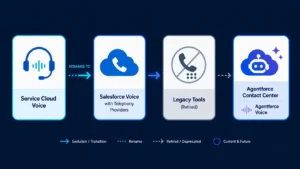
Short version: they’re largely the same underlying product line at different stages of rebranding, plus one newer AI-agent layer.
- Service Cloud Voice was Salesforce’s native, telephony-vendor-agnostic voice product, built around the Voice Call standard object.
- Salesforce Voice is the current name for that same product line after the rename.
- Agentforce Contact Center is Salesforce’s broader contact center suite, which folds in AI agent capabilities (Agentforce) on top of the voice layer.
- Agentforce Voice typically refers to the AI-agent-handled voice interactions inside that suite, not a separate purchasable product with its own SKU.
None of these are required to get basic CTI functionality working. They’re Salesforce’s own build-your-contact-center-on-our-stack path. If your team is on Cisco already, adopting this stack means running two parallel telephony platforms, or migrating off Cisco entirely.
Do You Need the Telephony Integration API to Connect Cisco to Salesforce?
Not if your CTI connector already handles the integration layer.
The Telephony Integration API exists so telephony vendors can build integrations that plug into Service Cloud Voice / Salesforce Voice. It’s infrastructure for vendors, not a checklist item for admins. If a connector already ships with that build finished, you don’t touch the API directly—you configure the connector and connect it to your existing Cisco environment.
That’s the distinction that gets lost in Salesforce’s own documentation: the API is a build requirement for integration vendors, not a deployment requirement for your team.
Already running Cisco and tired of untangling Salesforce’s product lineup?
The Maaz Technologies SmartConnect CTI Connector gives you screen pop, click-to-dial, and automatic call logging in Lightning connected directly to your existing Cisco environment. No Salesforce Voice license. No Agentforce Contact Center migration. No custom Telephony Integration API build.
What Happened to Sales Dialer (And Why It Doesn’t Affect Cisco Shops)
Sales Dialer was Salesforce’s sales-team-focused dialing feature, separate from the broader service/contact-center voice stack. Its deprecation only matters if you were actively using it for outbound sales dialing inside Salesforce’s native tooling.
If your call handling already runs through Cisco—Finesse, UCCE, UCCX, or Webex Contact Center—the Sales Dialer deprecation is a non-event. Your dialing, routing, and queue logic stay exactly where they are. The only thing that needs to change is how the call event reaches Salesforce for logging and screen pop.
The Screen-Pop and Auto Call Logging Workflow You Actually Want
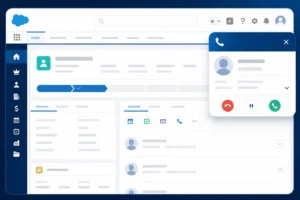
Strip away the product naming, and the ask from most Call Center Directors and Salesforce Admins is consistently the same three things:
- Click a phone number in Salesforce, and the call goes out through the existing Cisco environment.
- When a call lands, the matching Contact, Lead, or Case record pops automatically.
- When the call ends, a call record gets logged to that record without an agent manually creating it.
Nothing in that list requires a new voice platform. It requires a CTI connector that talks to Cisco on one side and Salesforce’s data model on the other.
How Maaz Technologies SmartConnect Skips the Product Maze
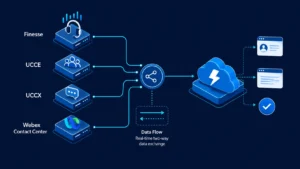
SmartConnect syncs Cisco (Finesse, UCCE, UCCX, or Webex Contact Center) with Salesforce server-to-server, instead of routing everything through a desktop softphone or a Salesforce-native voice product.
- Zero desktop switching — agents stay inside Lightning; SmartConnect handles the Cisco-side call control in the background.
- Native Omnichannel state sync — agent presence and call state stay accurate across Cisco and Salesforce simultaneously, so a call doesn’t show as “available” in one system and “on call” in the other.
- Automated call logging — every call writes a record to the correct object without agent data entry, which is the piece most manual workflows lose under call volume.
- No dependency on Salesforce Voice, Agentforce Contact Center, or the Telephony Integration API — SmartConnect is the integration layer, already built.
For teams optimizing Average Handle Time (AHT), the screen pop alone removes the lookup step agents currently do by hand—that’s usually the single biggest AHT win in these environments.
Implementation Timeline: Weeks, Not a Six-Month Roadmap
Because SmartConnect connects to your existing Cisco environment rather than requiring a new voice platform migration, deployment doesn’t carry the multi-quarter timeline that a full Service Cloud Voice or Agentforce Contact Center rollout typically does. Most Cisco environments are configured and tested in weeks, not a two-quarter project plan.
See It Running on Your Own Cisco Environment
If you’ve read this far because you’re trying to figure out whether you actually need a new Salesforce voice product just to get a screen pop and a logged call record, you don’t.
Book a live demo of the Maaz Technologies SmartConnect CTI Connector and we’ll walk through your specific Cisco setup (Finesse, UCCE, UCCX, or Webex CC) and show you the screen-pop, logging, and Omnichannel sync running against it directly.
-

-

AI Voice Assistants in Customer Service | Maaz Tech
-

How Microsoft Power Automate Can Save Your Business 10+ Hours a Week
-

Cisco Salesforce Integration Guide | Maaz Tech
-
AI and Automation in CRM: The Future of Business Efficiency
-

The Role of CRM Integration in Business Growth
-

How Mid-Sized Businesses Can Compete with CRM-Driven Strategies
-

Common CRM Implementation Challenges & Solutions
-

Microsoft Dynamics 365 vs Salesforce Comparison | Maaz Tech
-

Automating Cloud Resource Scaling via DevOps | Maaz Tech
-

Why DevSecOps Matters for Enterprise Security | Maaz Tech
-

AWS vs Azure vs GCP: Hybrid Automation Guide | Maaz Tech
-
What Is Service Orchestration and How Does It Improve Efficiency?
-
AWS Managed Services vs. Traditional Hosting: Which Is Better for You?
-
Top 5 Cybersecurity Threats in 2025 and How to Stay Safe
-
Chatbots vs. Voice AI: Which is Best for Your Customer Service?
-

API Integrations Without the Headache: Common Pitfalls & How to Avoid Them
-
Maaz Technologies Joins NVIDIA Inception
-

How AI Speech Analytics Improves Customer Interactions
-

Salesforce Voice, SCV & Agentforce: Cisco CTI Integration
